
8 Free photography workflow tools every photographer should know about
As photographers, we juggle way more than cameras. From planning shoots to managing clients, from editing late at night to delivering final galleries, the admin can eat up as much time as the art itself.
On top of that, the subscriptions add up fast. Adobe Creative Cloud, gallery hosting, cloud storage, CRM platforms… it can feel like every new tool comes with another monthly bill.
That’s why I lean on a handful of free photography workflow tools that cut the busywork and free up brainspace for what matters: creating.
I’ve tested a lot of tools (and dodged my fair share of spammy Google ads and “upgrade now” pop-ups). These 8 stand out because the free versions actually do the job, especially if you’re just getting your photography business off the ground.
These are the same tools I use inside my brand shoot planning workflow, which I’ve outlined step by step in my Brand Shoot Blueprint if you’d like to see how everything fits together.
8 Free photography workflow tools
What are photography workflow tools?
In simple terms, photography workflow tools are online platforms that help us organize, create, and deliver work without clunky installs or expensive setups.
For photographers, these tools are game-changers. Instead of juggling endless spreadsheets, email threads, and sticky notes, we can centralize everything from ideas to client delivery in one smooth workflow.
Think of them as your invisible studio assistant, helping keep everything running in the background so you can focus on the shot in front of you.
Why do photographers need to leverage free photography workflow tools?
Because running a photography business is more than just taking photos.
There’s inspiration, planning, editing, marketing, and client care. Free photography workflow tools streamline the admin side, making space for your creative flow.
Whether you’re building passion projects or running a busy client calendar, these free tools help you:
Save hours on repetitive tasks
Stay organized without overwhelm
Deliver a professional client experience without upfront costs
And that’s worth its weight in memory cards.
Using the right tools means less time bogged down in admin and more time out in the ocean with your camera (hoorah!). If that’s where you’d rather be, check out my 10 essential surf and water photography tips for beginners, it’s packed with practical advice for shooting in the waves.
The visuals you’ll see in this blog are all from the same surf photoshoot, starting with a Milanote mood board and finishing with the final Pixieset gallery.
1. Milanote: Crafting visual mood boards
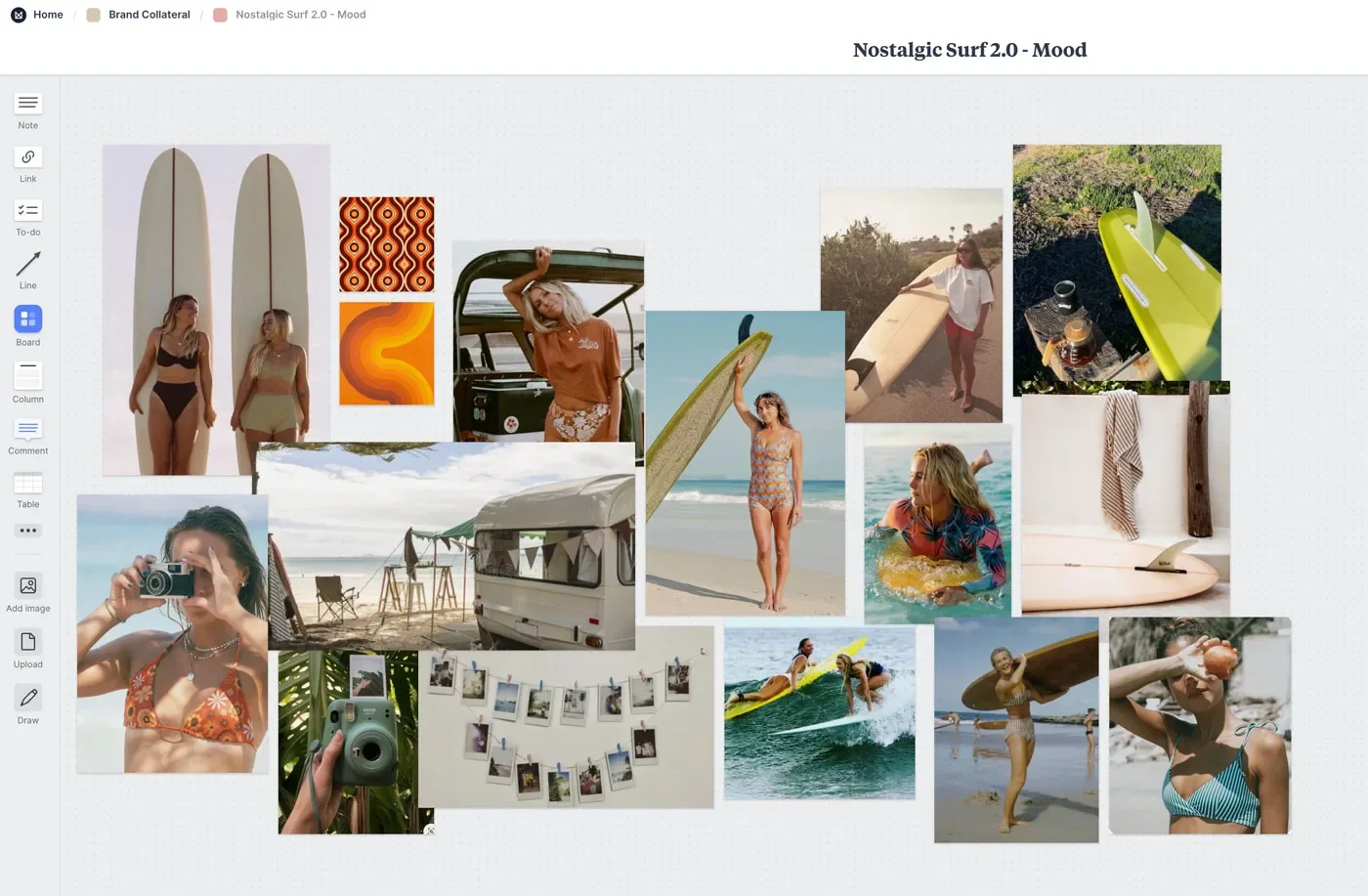
Visual inspiration is the heartbeat of creative photography. And Milanote has revolutionized the way I collate and organize mood boards for shoots, whether it’s a surf lifestyle project or commercial campaign.
Milanote is where most of my mood boards start to take shape visually before a shoot. I’ve shared my full process for creating mood boards for brand photography here if you’d like to see how I structure them step by step.
With its intuitive drag-and-drop boards, I can gather reference images, sketches, and notes into one cohesive visual story. The collaborative sharing makes it easy to get clients or creative teams on the same page before the shoot day.
2. Notion: Streamlining commercial and personal projects
If Milanote is my mood board studio, Notion is my command center. It is where I track shoots, plan timelines, and even manage life admin (yes, I even have a “mum life” board that keeps my household organized alongside my work).
The magic of Notion is in its flexibility. It can be as simple as a to-do list or as complex as a full client management system. For photographers balancing multiple projects, it is a lifesaver.
It’s also where I often map out my shot lists once a shoot concept is locked in, so everything we planned visually actually translates into what we capture on the day. I’ve shared exactly how I build shot lists for brand shoots here.
Pro tip: Create a dashboard for your photography business, from client shoots to print shop updates, so everything lives in one place.
3. DMDE: Rescuing data from corrupted memory cards
Few things make your heart drop faster than a corrupted memory card. DMDE is a free recovery tool that has saved me more than once.
It lets you recover up to 4,000 files for free, which is often enough to save a full shoot. Compared to paid recovery services that can cost $150 or more upfront, this is a no-brainer safety net for photographers.
Pro tip: Keep this one bookmarked, you will thank yourself if disaster strikes.
4. Lightroom Mobile: Editing on the go
Not every edit needs the full desktop setup. Lightroom Mobile is a powerful free app that allows photographers to edit, organize, and share images straight from their phone.
It is perfect for quick client sneak peeks, posting to social media in real time, or experimenting with edits while you are out and about. The free version already includes professional-level tools like exposure, color adjustments, and selective edits.
Pro tip: Use Lightroom Mobile with presets to keep your edits consistent whether you are on your laptop or phone. If ocean and coastal photography is your thing, my Oceania Lightroom presets are designed for exactly that and work across Lightroom desktop and mobile.
5. Pixieset: Elevating client galleries
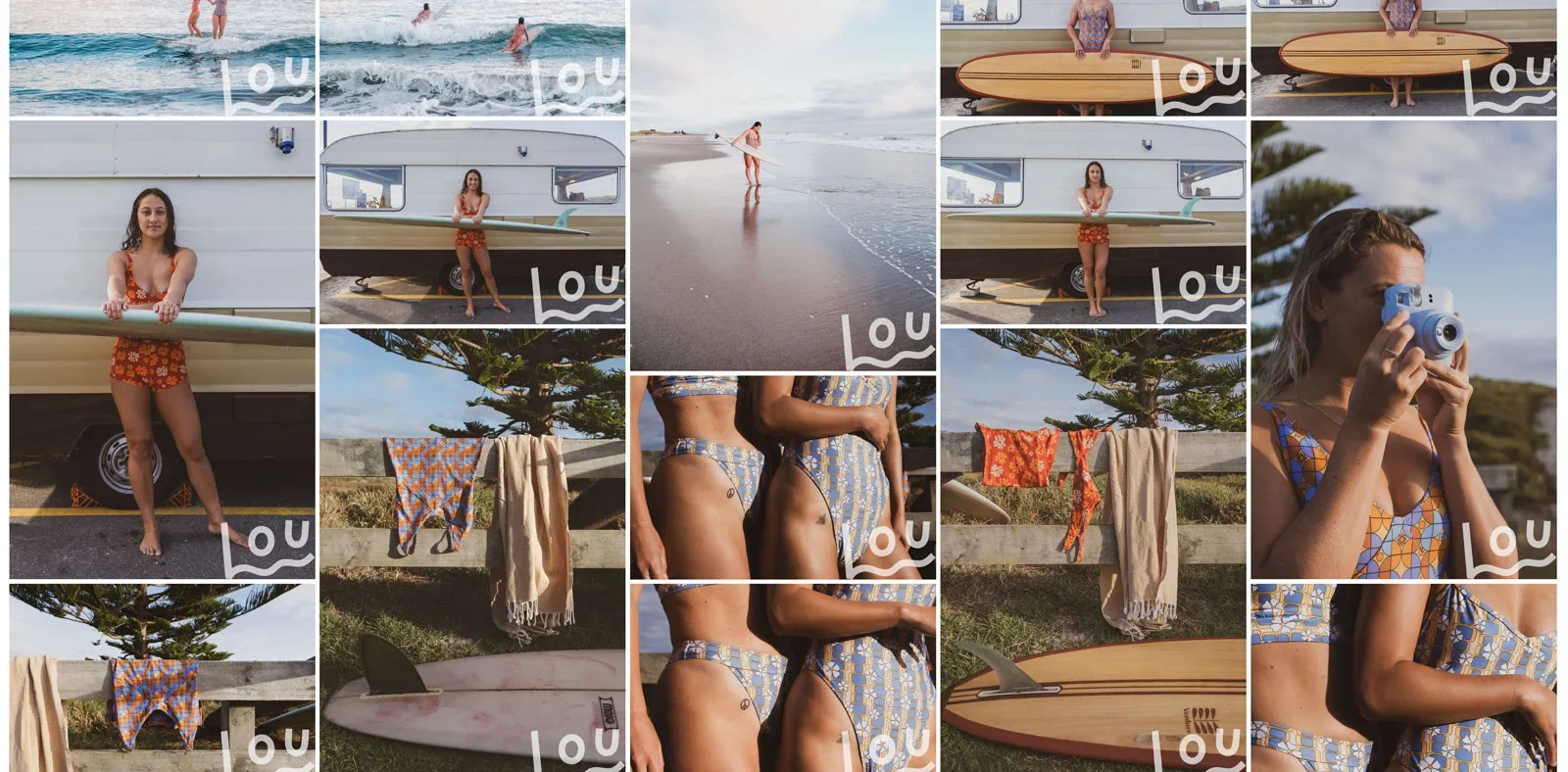
Here’s the actual shoot where I started with a Milanote mood board and then delivered the final gallery in Pixieset. This is literally how I work from start to finish.
Pixieset is the go-to platform for delivering online galleries. It gives clients a beautiful, easy way to view and download images, which instantly elevates the client experience.
The free plan has limits (storage and resolution), so you will need to rotate galleries. But for a beginner, it is more than enough. Once you are fully booked out, upgrading is 100 percent worth it.
6. Later Media Blog: Staying informed for social media success
Okay, this one is not technically a workflow tool, but it is a resource I swear by. The Later Media Blog is packed with up-to-date insights on social media trends, algorithm changes, and creative posting ideas that help photographers market themselves more effectively.
Think of it as your free crash course in social media strategy. While Later’s free scheduling tool has its limits, the blog itself is an invaluable source of inspiration and practical tips for keeping your online presence sharp.
Pro tip: Subscribe to their newsletter so you get updates delivered straight to your inbox without having to hunt for them.
7. Squarespace Bio Sites: Turning one link into many
Social platforms give you one link. Photographers and creators need ten. Prints, presets, galleries, newsletters, collaborations — they all compete for that single spot.
I have tested competitors like LinkTree, but I switched to Squarespace Bio Sites because it just feels cleaner and more modern. The templates look polished, it matches my Squarespace site, and it creates a seamless experience for anyone clicking through from Instagram or TikTok.
What I love most is the control it gives me over the customer journey. I can highlight different parts of my business depending on the season — whether that is fine art prints, presets, or client work — and make sure people land in the right place. Instead of feeling like an afterthought, it looks and feels like a natural extension of my brand.
If you’re a creator who wants your social presence to align with your website and marketing goals, this is one of the best free tools to start with.
8. Canva: Designing digital and print assets with ease
We might be photographers, but design still sneaks into our workflow. Canva makes it easy to create client vouchers, pitch decks, Instagram posts, and even print layouts, all without advanced design software.
It is also perfect for marketing presets. I love using Canva mockups to show before and after edits, a quick, visual way to highlight how presets elevate an image.
It is also perfect for marketing presets. I used Canva to create some of the promotional graphics for Oceania, my ocean and seascape Lightroom preset collection, including visuals that show the edits in action.
That’s a wrap
The right tools don’t replace creativity, they protect it. Milanote, Notion, Canva, DMDE, Lightroom Mobile, Pixieset, Later Media Blog and Canva are six free photography workflow tools that help me stay organized, deliver better work, and carve out more space for inspiration.
Try one this week and notice how it transforms your process. Send me a message in the comments below to let me know how it goes!
Until next,
L ✌️
FAQs: Photography workflow tools
What are photography workflow tools?
Photography workflow tools are apps or platforms that help photographers streamline planning, editing, delivery, and marketing. They save time and reduce admin so you can focus more on creativity.
Are these free tools really enough for professional photographers?
Yes. While many of these tools have paid upgrades, the free versions are surprisingly powerful. They are ideal for beginners and pros who want to keep costs low without sacrificing quality.
Which is the best free photo editing tool for photographers?
Lightroom Mobile is one of the best free editing apps available. It includes pro-level tools like exposure control, color grading, and selective edits, and works seamlessly with presets.
What is the best client gallery platform for photographers?
Pixieset is one of the most popular client gallery platforms. The free plan offers a polished delivery experience for clients, making it a great choice for photographers just starting out.
How can I organize my photography projects more efficiently?
Notion and Milanote are excellent tools. Notion is best for task management and timelines, while Milanote shines for visual mood boards and creative shoot planning.
What is a Link in Bio tool and why do photographers need one?
A Link in Bio tool lets you create a mini landing page with multiple links from your Instagram profile. It helps convert followers into clients, print buyers, or newsletter subscribers.